Tinus EngOps Wiki

OpsaC - Operating as PowerShell code
Links
Home IT-Wiki PowerShell Blog PowerShell Index PowerShell SearchAdditional Websites
View my GitHub Profile View my GitHub Gists View my Codeberg Page View my Photo WebsiteMysqlDB
published: July 17, 2021 author: Tinu tags: MongoDB - MysqlDB - Python - Scripting - VSCode categories: Datenbank
Auf pythonanywhere.com kann mit dem kostenlosen Beginner Account ein Python-Script mit einem Scheduler einmal täglich ausgeführt werden. Dieses Script kann z. B. Daten in eine MySQL DB auf pythonanywhere.com speichern. Will man die Daten auf eine extere Datenbank (z. B. Atlas MongoDB) auslagern muss ein kostenpflichtiger Account gelöst werden.
In diesem Beitrag erstelle ich eine Test DB auf Docker mit MySQL, damit ich mein Python-Script lokal testen kann bevor ich es auf pythonanywhere.com einsetze.
Docker
Mit Docker erstelle ich einen MySQL Container auf Basis des offiziellen Images von Docker Hub.
Environment erstellen
Custom Netzwerk und das Volume für den MySQL Server erstellen:
docker network create custom
docker volume create mysqldata
Image und Container erstellen
MySQL Image von Docker Hub herunterladen:
docker pull mysql:latest
Container erstellen. Wichtig ist hier die Zeitzone (-e TZ=”Europe/Zurich”) zu setzen, damit bei einem Insert des aktuellen Datum/Zeit der korrekte TimeStamp geschrieben wird.
docker run -e TZ="Europe/Zurich" `
 -e 'MYSQL_ROOT_PASSWORD=my-secret-pw' `
 -p 3306:3306 `
 -v mysqldata:/var/lib/mysql `
 --hostname mysqlsrv1 `
 --name mysqlsrv1 `
 --network custom `
 -d mysql:latest
Connect to MysqlDB
Nachdem der Container gestartet (docker start mysqlsrv1) ist, kann mit VSCode und den MySQL Extensions auf die MysqlDB zugegriffen werden, siehe Extension für MySQL.
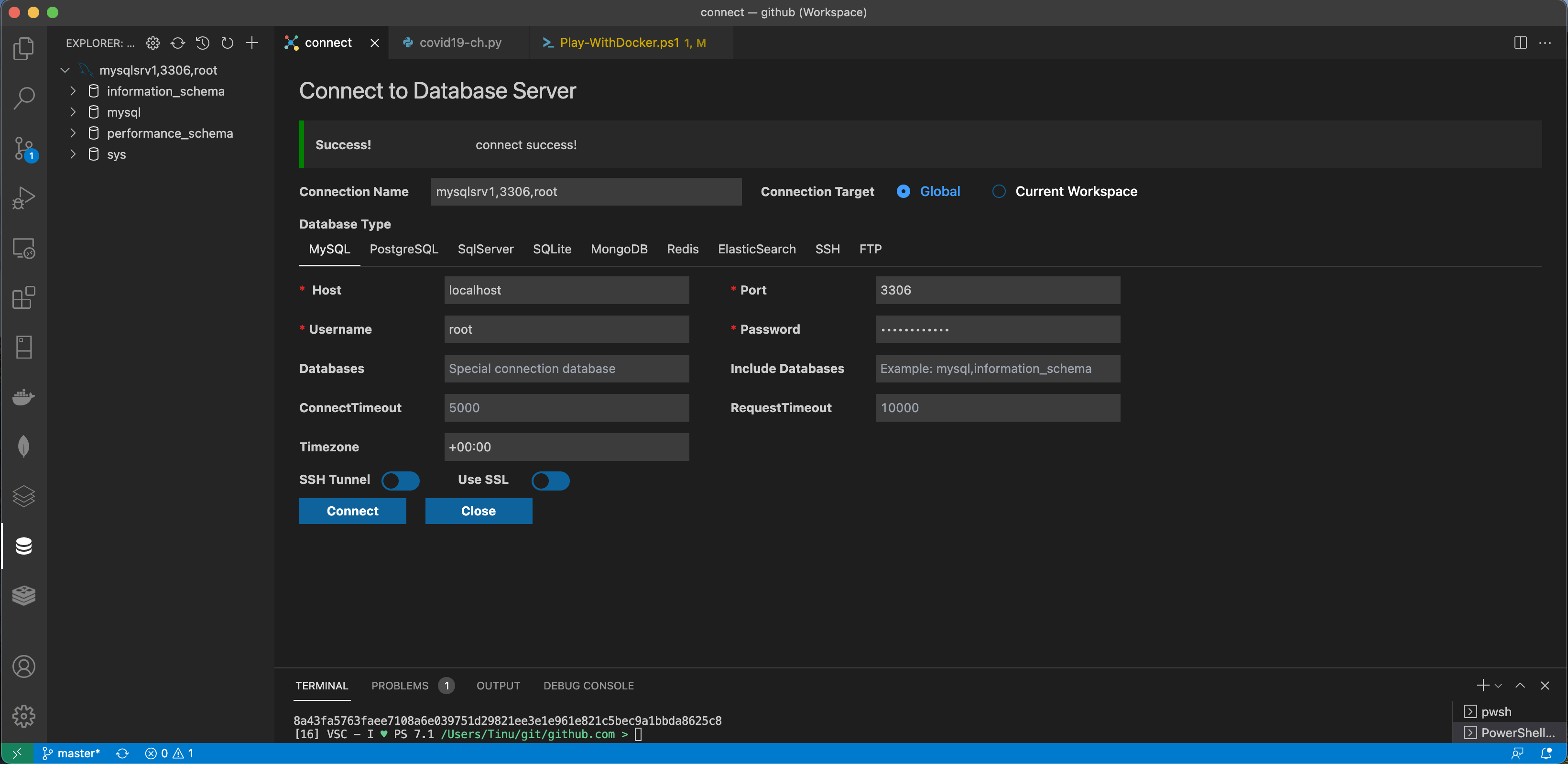 Mit diesen Extensions kann eine neue Datenbank erstellt werden, Daten aus einem SQL-File importiert und auch exportiert werden.
Python code
Import JSON
Importiert ein JSON-file in die angegebene Tabelle. Wenn die Tabelle existiert, wird sie zuerst gelöscht. Folgende Functions stehen zur Verfügung: validat_string(), get_table(), drop_table(), create_table(), insert_into() und import_json().
import pymysql, os, json, sys, getpass

def validate_string(val):
    '''Do validation and checks before insert'''
    if val != None:
        if type(val) is int:
            return str(val).encode('utf-8')
        else:
            return val

def get_table(sqlconnection, table):
    '''Test table exists'''
    sql = "SHOW TABLES LIKE '%s' "% ('%'+str(table)+'%')
    try:
        cursor = sqlconnection.cursor()
        cursor.execute(sql)
        result = cursor.fetchone()
        print('[INFO]\t{0}():\tTable {1} = {2}'.format(sys._getframe().f_code.co_name, table, result[0]))
    except Exception as e:
        print('[WARN]\t{0}():\t{1}'.format(sys._getframe().f_code.co_name, e))
        result = False

    return result

def drop_table(sqlconnection, table):
    '''Dropping table if already exists'''
    sql = 'DROP TABLE IF EXISTS ' + table
    try:
        cursor = sqlconnection.cursor()
        cursor.execute(sql)
        print('[INFO]\t{0}():\tTable {1} dropped'.format(sys._getframe().f_code.co_name, table))
        return True
    except Exception as e:
        print('[WARN]\t{0}():\t{1}'.format(sys._getframe().f_code.co_name, e))
        return False

def create_table(sqlconnection, table, tabledefinition):
    '''Creating table'''
    sql = "CREATE TABLE " + table + "(" + tabledefinition + ")"
    try:
        cursor = sqlconnection.cursor()
        cursor.execute(sql)
        print('[INFO]\t{0}():\tTable {1} created'.format(sys._getframe().f_code.co_name, table))
        return True
    except Exception as e:
        print('[WARN]\t{0}():\t{1}'.format(sys._getframe().f_code.co_name, e))
        return False

def insert_into(sqlconnection, table, date, cases, hosp, death, output = False):
    '''Insert one record'''
    errorcount = 0
    try:
        cursor = sqlconnection.cursor()
        cursor.execute(
            "INSERT INTO " + table + " (date, cases, hosp, death) VALUES (%s,%s,%s,%s)", (date, cases, hosp, death)
        )
        sqlconnection.commit()
        if output:
            print('[INFO]\t{0}():\tRecord inserted into table {1}'.format(sys._getframe().f_code.co_name, table))
        return True
    except Exception as e:
        print('[WARN]\t{0}():\t{1}'.format(sys._getframe().f_code.co_name, e))
        errorcount + 1
        return False

def import_json(json_file, sqlconnection, table, field1, field2, field3, field4, droptable = False):
    '''Import data from JSON-file'''
    check_path = os.path.exists(json_file)
    if(check_path == True):

        # Read JSON file
        json_data = open(json_file).read()
        json_obj  = json.loads(json_data)

        if droptable:
            if drop_table(sqlconnection, table):
                create_table(sqlconnection, table, 'date VARCHAR(10) NOT NULL, cases INT, hosp INT, death INT')

        # parse json data to SQL insert
        errorcount   = 0
        successcount = 0
        for i, item in enumerate(json_obj):
            date  = validate_string(item.get(field1, None))
            cases = int(validate_string(item.get(field2, None)))
            hosp  = int(validate_string(item.get(field3, None)))
            death = int(validate_string(item.get(field4, None)))

            try:
                result = insert_into(sqlconnection, mytable, date, cases, hosp, death)
                if result:
                    successcount = successcount + 1
                else:
                    errorcount   = errorcount + 1
            except Exception as e:
                print('[WARN]\t{0}():\t{1}'.format(sys._getframe().f_code.co_name, e))
                errorcount + 1

        print('[INFO]\t{0}():\tInserted {1} records with {2} errors'.format(sys._getframe().f_code.co_name, successcount ,errorcount))

if __name__ =="__main__":

    # Join the path to Downloads
    if sys.platform == "linux" or sys.platform == "linux2":
        home_dir = os.environ['HOME']
    elif sys.platform == "darwin":
        home_dir = os.environ['HOME']
    elif sys.platform == "win32":
        home_dir  = os.environ['USERPROFILE']
    downloads = os.path.join(home_dir,'Downloads')

    json_file = os.path.join(downloads, 'MongoDB.Atlas.Covid19.json')

    # Initiate variables
    sqlhost   = 'localhost'
    sqluser   = 'root'
    sqlusrpw  = getpass.getpass("Enter the password:")
    mydb      = 'tinu'
    mytable   = 'covid19'
    droptable = True

    # Connect to MySQL
    sqlconnection = pymysql.connect(host = sqlhost, user = sqluser, password = sqlusrpw, db = mydb)

    # Import JSON file
    if get_table(sqlconnection, mytable):
        pass
    else:
        create_table(sqlconnection, mytable, 'date VARCHAR(10) NOT NULL, cases INT, hosp INT, death INT')

    # Import from Atlas-MongoDB
    import_json(json_file, sqlconnection, mytable, field1="Datum", field2="Neue Fälle", field3="Hospitalisationen", field4="Todesfälle", droptable = True)

    # Import from Pythonanywhere-MysqlDB
    import_json(json_file, sqlconnection, mytable, field1="Date", field2="Cases", field3="Hosp", field4="Death", droptable = True)

    sqlconnection.close()
Export JSON
Exportiert die angegebene Tabelle in ein JSON-file. Folgende Functions stehen zur Verfügung: get_rows() und export_json().
import pymysql, sys, os, json, getpass
from bson.json_util import dumps

def get_rows(sqlconnection, table, output = False):
    '''Get all rows from table'''
    sql = "SELECT * FROM %s"% (str(table))
    try:
        cursor = sqlconnection.cursor()
        cursor.execute(sql)
        result = cursor.fetchall()
        if output:
            print('[INFO]\t{0}():\tTable {1} = {2}'.format(sys._getframe().f_code.co_name, table, result[0]))
    except Exception as e:
        print('[WARN]\t{0}():\t{1}'.format(sys._getframe().f_code.co_name, e))

    return result

def export_json(json_file, sqlconnection, table, output = False):
    '''Export as JSON'''
    sqldata = get_rows(sqlconnection, table, output = False)
    if sqldata:
        try:
            result_of_history = []
            for row in sqldata:
                thisdict = {
                    'Date'   : row[0],
                    'Cases'  : row[1],
                    'Hosp'   : row[2],
                    'Death'  : row[3],
                }
                result_of_history.append(thisdict)

            # Converting to the JSON
            json_data = dumps(result_of_history)

            # Writing data to file data.json
            with open(json_file, "w") as write_file:
                write_file.write(json_data)

            if os.path.exists(json_file):
                if output:
                    print("[INFO]\t{0}():\tFile saved as {1}".format(sys._getframe().f_code.co_name, json_file))
            else:
                if output:
                    print("[INFO]\t{0}():\tCould not save file as {1}".format(sys._getframe().f_code.co_name, json_file))

            return True

        except Exception as e:
            print("[WARN]\t{0}():\t{1}".format(sys._getframe().f_code.co_name, e))
            return False

if __name__ =="__main__":

    # Join the path to Downloads
    if sys.platform == "linux" or sys.platform == "linux2":
        home_dir = os.environ['HOME']
    elif sys.platform == "darwin":
        home_dir = os.environ['HOME']
    elif sys.platform == "win32":
        home_dir  = os.environ['USERPROFILE']
    downloads = os.path.join(home_dir,'Downloads')

    # Initiate variables
    sqlhost   = 'localhost'
    sqluser   = 'root'
    sqlusrpw  = getpass.getpass(prompt = 'Enter the password:')
    mydb      = 'tinu'
    mytable   = 'covid19'

    # Open database connection
    sqlconnection = pymysql.connect(host = sqlhost, user = sqluser, password = sqlusrpw, db = mydb)

   json_file = os.path.join(downloads, 'MysqlDB.tinu.covid19.json')
   result = export_json(json_file, sqlconnection, mytable, output = True)
Insert one record
Einen einzelnen Record kann mit folgendem Code in die Tabelle geschrieben werden. Folgende Functions stehen zur Verfügung: insert_into().
import pymysql, os, json, sys, getpass

def insert_into(sqlconnection, table, date, cases, hosp, death, output = False):
    '''Insert one record'''
    errorcount = 0
    try:
        cursor = sqlconnection.cursor()
        cursor.execute(
            "INSERT INTO " + table + " (date, cases, hosp, death) VALUES (%s,%s,%s,%s)", (date, cases, hosp, death)
        )
        sqlconnection.commit()
        if output:
            print('[INFO]\t{0}():\tRecord inserted into table {1}'.format(sys._getframe().f_code.co_name, table))
        return True
    except Exception as e:
        print('[WARN]\t{0}():\t{1}'.format(sys._getframe().f_code.co_name, e))
        errorcount + 1
        return False

if __name__ =="__main__":

    # Initiate variables
    sqlhost   = 'localhost'
    sqluser   = 'root'
    sqlusrpw  = getpass.getpass("Enter the password:")
    mydb      = 'tinu'
    mytable   = 'covid19'

    # Connect to MySQL
    sqlconnection = pymysql.connect(host = sqlhost, user = sqluser, password =                 sqlusrpw, db = mydb)

    # Insert one record
    insert_into(sqlconnection, mytable, '17.07.2021', 666, 3, 0, output = True)

    sqlconnection.close()
Read all rows
Die Tabelle auslesen und in ein Pandas DataFrame speichern und weiterverarbeiten als Charts. Die Charts werden im Downloads Folder als PNG-Files abgespeichert. Folgende Functions stehen zur Verfügung: save_linechart() und save_linechart().
import pymysql, os, json, sys, getpass, re
import pandas as pd, matplotlib.pyplot as plt
from datetime import datetime

def get_rows(sqlconnection, table, output = False):
    '''Get all rows from table'''
    sql = "SELECT * FROM %s"% (str(table))
    try:
        cursor = sqlconnection.cursor()
        cursor.execute(sql)
        result = cursor.fetchall()
        if output:
            print('[INFO]\t{0}():\tTable {1} = {2}'.format(sys._getframe().f_code.co_name, table, result[0]))
    except Exception as e:
        print('[WARN]\t{0}():\t{1}'.format(sys._getframe().f_code.co_name, e))

    return result

def save_linechart(data, x, y, title, path):
    '''Create chart and save it to downloads'''
    try:
        chart = data.plot.line(
            x       = x,
            xlabel  = "",
            ylabel  = "",
            y       = y,
            title   = title,
            grid    = True,
            legend  = True,
            figsize = (20,5)
        )
        ### Save chart as png-file
        fig = chart.get_figure()
        fig.savefig(f'{path}', facecolor='w', bbox_inches='tight')
        if os.path.exists(path):
            print('[INFO]\t{0}():\tChart saved as {1}'.format(sys._getframe().f_code.co_name, path))
        else:
            print('[INFO]\t{0}():\tCould not save chart as {1}'.format(sys._getframe().f_code.co_name, path))
    except Exception as e:
        print('[WARN]\t{0}():\t{1}'.format(sys._getframe().f_code.co_name, e))

if __name__ =="__main__":

    # Join the path to Downloads
    if sys.platform == "linux" or sys.platform == "linux2":
        home_dir = os.environ['HOME']
    elif sys.platform == "darwin":
        home_dir = os.environ['HOME']
    elif sys.platform == "win32":
        home_dir  = os.environ['USERPROFILE']
    downloads = os.path.join(home_dir,'Downloads')

    # Initiate variables
    sqlhost   = 'localhost'
    sqluser   = 'root'
    sqlusrpw  = getpass.getpass("Enter the password:")
    mydb      = 'tinu'
    mytable   = 'covid19'

    # Connect to MySQL
    sqlconnection = pymysql.connect(host = sqlhost, user = sqluser, password = sqlusrpw, db = mydb)

    # Get mysql-table and convert to dictionary
    covid_data = get_rows(sqlconnection, mytable)
    sqlconnection.close()

    result_of_history = []
    for row in covid_data:
        thisdict = {
            'Date'   : datetime.strptime(row[0], '%d.%m.%Y'),
            'Cases'  : row[1],
            'Hosp'   : row[2],
            'Death'  : row[3],
        }
        result_of_history.append(thisdict)

    ## Create a data frame set and print out as table
    df = pd.DataFrame(result_of_history)
    print(df)

    count_of_datum = df.Date.count()
    first_value    = str(re.findall(r'\d{4}\-\d{2}\-\d{2}', str(df.Date.values[0]))[0])
    last_value     = str(re.findall(r'\d{4}\-\d{2}\-\d{2}', str(df.Date.values[count_of_datum -1]))[0])

    ## Print data frame set as line chart
    save_linechart(df, 'Date', ['Cases'], f"Laborbestätige neu gemeldete Fälle - Stand: {last_value}", os.path.join(downloads,'covid-dayli-newcases.png'))
    save_linechart(df, 'Date', ['Hosp','Death'], f"Laborbestätige Hospitalisierungen und Todesfälle - Stand: {last_value}", os.path.join(downloads,'covid-dayli-host-dead.png'))
Grafiken vom 16.07.2021
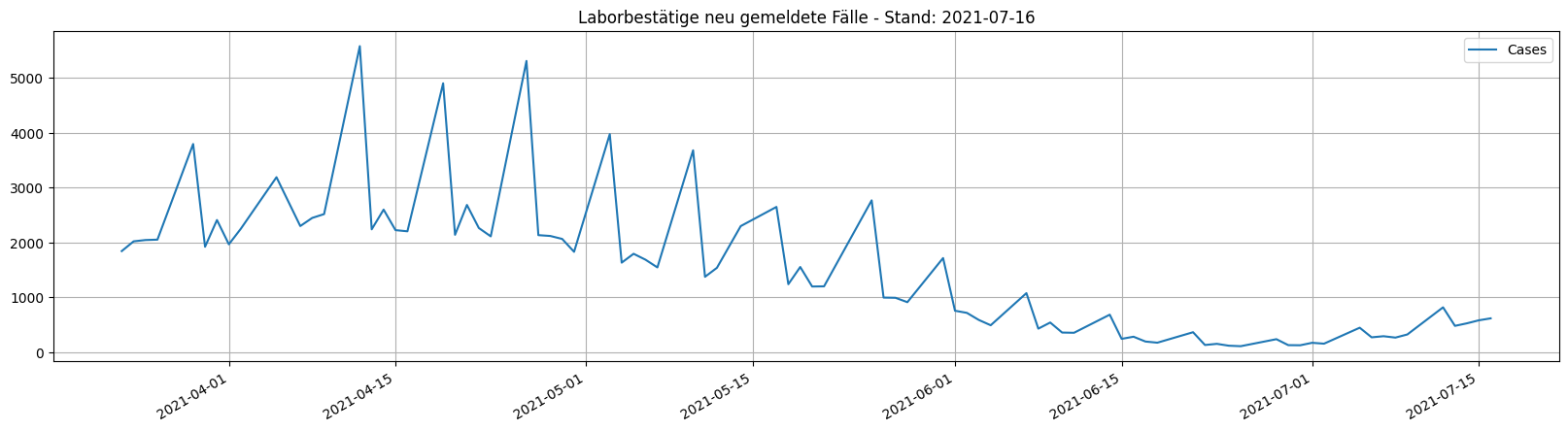 <figcaption>
covid-dayli-newcases.png</figcaption>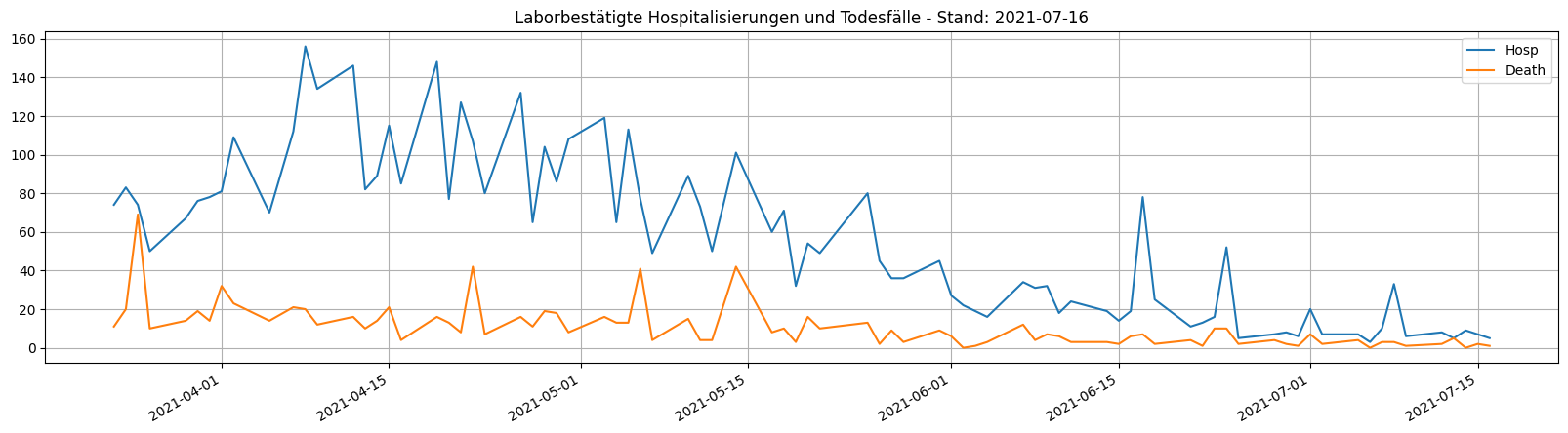 <figcaption>
covid-dayli-host-dead.png</figcaption>## PythonAnywhere
Auf PythonAnywhere musste ich das Modul MySQLdb einsetzen. Die aktuellen Charts werden mit oben aufgeführtem Code auf tinuwalther.pythonanywhere.com täglich aufbereitet und können eingesehen werden.
Git-Project
Das vollständige Covid19-Projekt steht auf meinen GitHub Profile zur freien Verfügung.
References
Python MySQL, Python - MySQL Database Access