Tinus EngOps Wiki

OpsaC - Operating as PowerShell code
Links
Home IT-Wiki PowerShell Blog PowerShell Index PowerShell SearchAdditional Websites
View my GitHub Profile View my GitHub Gists View my Codeberg Page View my Photo WebsiteWebApps mit PowerShell Teil 2
published: January 23, 2022 author: Tinu tags: PowerShell - WebApps categories: PowerShell - Webserver
Eine WebApp mit PowerShell programmieren, kann man das? Ja klar, das geht mit den PowerShell Modulen Pode und Pode.Web von Matthew Kelly alias Badgerati.
Hier folgt nun der 2. Teil meiner Implementierungen. Den ersten Teil könnt ihr unter WebApps mit PowerShell Teil 1 | (martin-walther.ch) nachlesen.
Pode Server mit Zertifikat
Als Erstes soll der Pode Server mit einem Zerifikat ausgerüstet und dann auf das Protokoll https umgestellt werden.
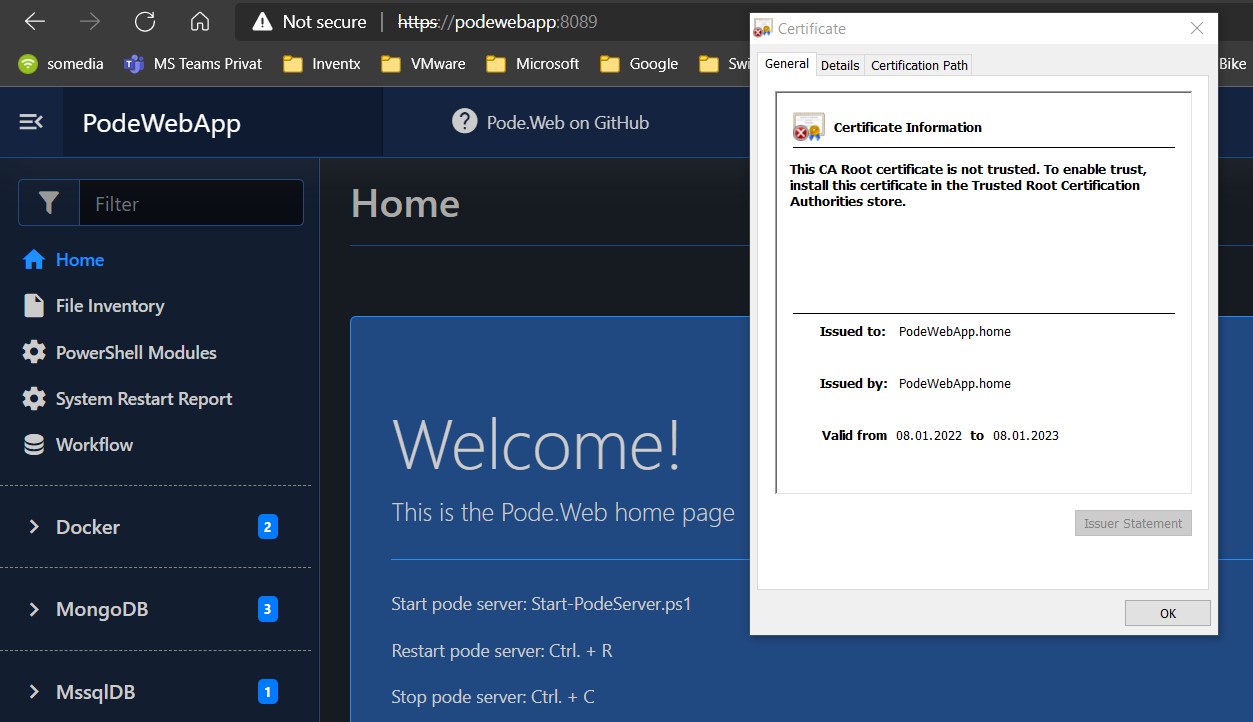 ### SelfSignedCertificate erstellen
Zuerst wird ein Zertifikat für die Website erstellt. Der einfachheithalber mach ich das mit einem SelfSignedCertificate mit PowerShell. In einer produktiven Umgebung sollte natürlich ein Zertifikat von einer vertrauenswürdigen PKI bezogen werden, dann wird euch auch die Not secure Warning im Browser nicht angezeigt.
New-SelfSignedCertificate -DnsName 'PodeWeb.home' -CertStoreLocation 'Cert:\CurrentUser\My'
DnsName Resolution einrichten
Nun wird entweder auf dem DNS ein A-Record erstellt, oder im lokalen Hostsfile. In diesem Beispiel mache ich das im lokalen Hostsfile mit meinem PowerShell Module PsNetTools.
Add-PsNetHostsEntry -IPAddress 127.0.0.1 -Hostname 'PodeWeb' -FullyQualifiedName 'PodeWeb.home'
Umstellen auf https
Nun wird der Pode Server auf https umgestellt und das Zertifikat aus dem Windows Certificate Store eingebunden.
Import-Module Pode.Web

Start-PodeServer {
    #region HTTPS
    $EPProperties = @{
        Address  = 'PodeWebApp'
        Port     = 8089
        Protocol = 'https'
        CertificateName = 'PodeWebApp.home'
        CertificateStoreLocation = 'CurrentUser'
    }
    Add-PodeEndpoint @EPProperties
    #endregion
    New-PodeLoggingMethod -Path .\logs -Name "PodeWebServer.log" | Enable-PodeErrorLogging

    Use-PodeWebTemplates -Title "PodeWebApp" -Theme Auto
    $Properties = @{
        Name = 'Pode.Web on GitHub'
        Url  = 'https://github.com/Badgerati/Pode.Web'
        Icon = 'help-circle'
    }
    $navgithub  = New-PodeWebNavLink @Properties -NewTab
    Set-PodeWebNavDefault -Items $navgithub

    foreach($item in (Get-ChildItem (Join-Path $PSScriptRoot -ChildPath 'pages')))  {
        . "$($item.FullName)"
    }

    $Path = "microsoft-edge:$($EPProperties.Protocol)://$($EPProperties.Address):$($EPProperties.Port)/"
    Start-Process $Path -WindowStyle maximized
}
MongoDB CRUD Operations
CRUD operations bedeuten Create, Read, Update, and Delete documents. In diesem Beispiel, bilde ich diese Operationen in einer Website als Workkflow ab.
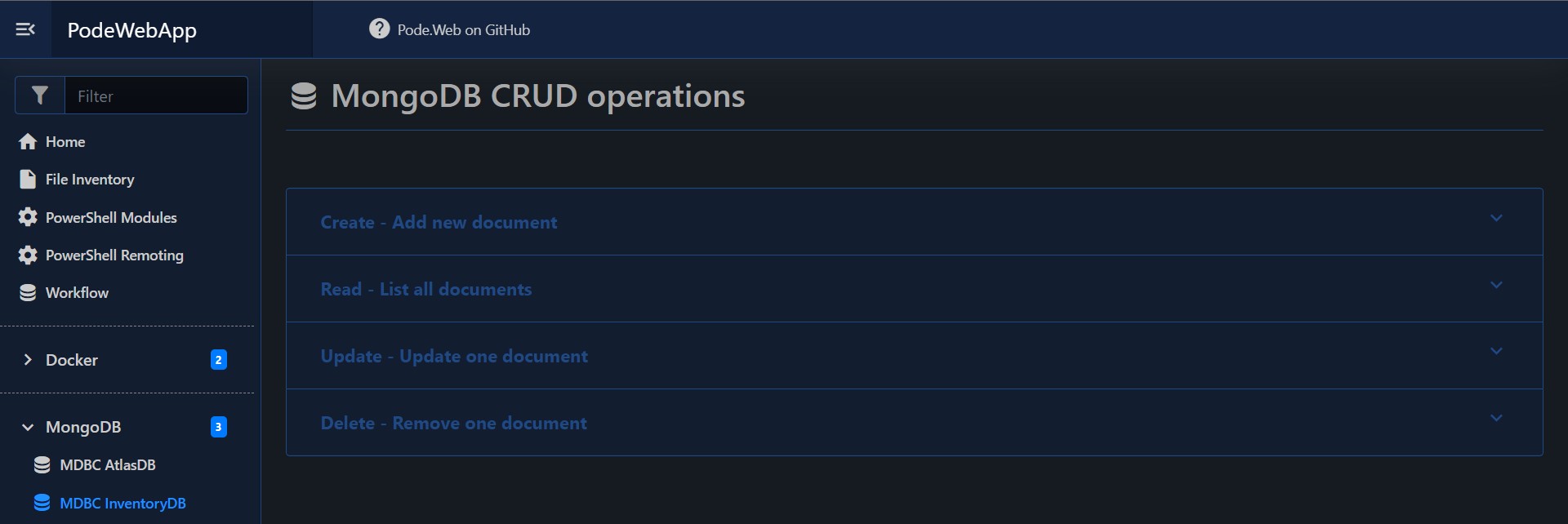 ### Page
Die Page wird mit folgendem Code aufgebaut:
Add-PodeWebPage -Group 'MongoDB' -Name 'MDBC InventoryDB' -Title 'MongoDB CRUD operations' -Icon 'database' -ScriptBlock {

    Import-Module .\functions\docker.psm1  -Force

    $IsRunning = Test-IsDockerRunning
    if($IsRunning){
        $container_name = 'mongodb1'
        $status = Test-IsContainerRunning -ContainerName $container_name
        if($status -match 'Up'){
            #Show-PodeWebToast -Message "Container $($container_name) $($status)" -> this ends in a empty page!
            New-PodeWebAccordion -Bellows @(

                New-PodeWebBellow -Name 'Create - Add new document' -Content @(
                    New-PodeWebForm -Id 1 -Name 'Add new document' -ScriptBlock {
                        Import-Module .\functions\mongodb.psm1 -Force
                        $mongo_col = Initialize-MongoDB

                        $document1 = @{
                            ID               = $(New-Guid).ToString()
                            RunTime	         = Get-Date -Format s
                            DeviceName	     = $WebEvent.Data.Name
                            DeviceType	     = $WebEvent.Data.Type
                            'Physical cores' = [Int]$WebEvent.Data.CPU
                            MemoryGB         = [Int]$WebEvent.Data.Memory
                            DiskspaceGB      = [Int]$WebEvent.Data.Diskspace
                            PurchaseDate     = Get-Date $WebEvent.Data.Purchased -Format s
                            Price            = [Double]$WebEvent.Data.CHF
                            Payment	         = $WebEvent.Data.Payment
                            Warranty         = $WebEvent.Data.Warranty
                            Link             = $WebEvent.Data.Link
                        }
                        $NewDocument = Add-MongoDBDocument -Collection $mongo_col -Document $document1
                        $NewDocument | Out-PodeWebTable
                        Show-PodeWebToast -Message "Added $($NewDocument.ID)"
                        Move-PodeWebAccordion -Name 'Read - List all documents'
                    } -Content @(
                        New-PodeWebTextbox -Name 'Name'      -Value 'ThinkPad'
                        New-PodeWebTextbox -Name 'Type'      -Value 'Notebook'
                        New-PodeWebTextbox -Name 'CPU'       -Value '4'
                        New-PodeWebTextbox -Name 'Memory'	 -Value '8'
                        New-PodeWebTextbox -Name 'Diskspace' -Value '512'
                        New-PodeWebTextbox -Name 'Purchased' -Value '2021-12-21'
                        New-PodeWebTextbox -Name 'CHF'       -Value '1999'
                        New-PodeWebSelect  -Name 'Payment'   -Options @('Cash','Maestrocard','Mastercard','Visacard','Invoice')
                        New-PodeWebTextbox -Name 'Warranty'  -Value '2+1'
                        New-PodeWebTextbox -Name 'Link'      -Value 'https://tinuwalther.github.io'
                    )
                )

                New-PodeWebBellow -Name "Read - List all documents" -Content @(
                    New-PodeWebTable -Id 2 -Name 'List all documents' -SimpleSort -SimpleFilter -ScriptBlock {
                        Import-Module .\functions\mongodb.psm1 -Force
                        $mongo_col = Initialize-MongoDB
                        Get-MongoDBData -Collection $mongo_col
                    }
                )

                New-PodeWebBellow -Name 'Update - Update one document' -Content @(
                    New-PodeWebForm -Id 3 -Name 'Update one document' -ScriptBlock {
                        Import-Module .\functions\mongodb.psm1 -Force
                        $mongo_col = Initialize-MongoDB

                        $filter_json3 = @{ID = $WebEvent.Data.ID}
                        $document3 = @{
                            RunTime	         = Get-Date -Format s # --> Element name 'RunTime' is not valid'
                            DeviceName	     = [String]$WebEvent.Data.Name
                            DeviceType	     = [String]$WebEvent.Data.Type
                            'Physical cores' = [Int]$WebEvent.Data.CPU
                            MemoryGB         = [Int]$WebEvent.Data.Memory
                            DiskspaceGB      = [Int]$WebEvent.Data.Diskspace
                            PurchaseDate     = Get-Date $WebEvent.Data.Purchased -Format s
                            Price            = [Double]$WebEvent.Data.CHF
                            Payment	         = [String]$WebEvent.Data.Payment
                            Warranty         = [String]$WebEvent.Data.Warranty
                            Link             = [String]$WebEvent.Data.Link
                        }
                        $UpdateDocument = Update-MongoDBDocument -Filter $filter_json3 -Collection $mongo_col -Document $document3
                        $UpdateDocument | Out-PodeWebTable
                        Show-PodeWebToast -Message "Updated $($UpdateDocument.ID)"
                        Move-PodeWebAccordion -Name 'Read - List all documents'
                    } -Content @(
                        New-PodeWebTextbox -Name 'ID'        -Value 'Enter the ID of the document to update'
                        New-PodeWebTextbox -Name 'Name'      -Value 'ThinkPad'
                        New-PodeWebTextbox -Name 'Type'      -Value 'Notebook'
                        New-PodeWebTextbox -Name 'CPU'       -Value '4'
                        New-PodeWebTextbox -Name 'Memory'	 -Value '8'
                        New-PodeWebTextbox -Name 'Diskspace' -Value '512'
                        New-PodeWebTextbox -Name 'Purchased' -Value '2021-12-21'
                        New-PodeWebTextbox -Name 'CHF'       -Value '1999'
                        New-PodeWebSelect  -Name 'Payment'   -Options @('Cash','Maestrocard','Mastercard','Visacard','Invoice')
                        New-PodeWebTextbox -Name 'Warranty'  -Value '2+1'
                        New-PodeWebTextbox -Name 'Link'      -Value 'https://tinuwalther.github.io'
                    )
                )

                New-PodeWebBellow -Name 'Delete - Remove one document' -Content @(
                    New-PodeWebForm -Id 4 -Name "Remove document" -ScriptBlock {
                        Import-Module .\functions\mongodb.psm1 -Force
                        $mongo_col = Initialize-MongoDB

                        $filter_json4 = @{ID = $WebEvent.Data.ID}
                        $data = Get-MongoDBDocument -Collection $mongo_col -Filter $filter_json4
                        Show-PodeWebToast -Message "Removed $($data.ID)"
                        Remove-MongoDBDocument -Collection $mongo_col -Filter $filter_json4 | Out-PodeWebTable
                        Move-PodeWebAccordion -Name 'Read - List all documents'
                    } -Content @(
                        New-PodeWebTextbox -Name 'ID'
                    )
                )
            )

        }else{
            New-PodeWebCard -Name "Docker Container $($container_name)" -Content @(
                New-PodeWebText -Value "Docker Container is $($status)" -InParagraph
            )
        }
    }else{
        New-PodeWebCard -Name "Docker Container" -Content @(
            New-PodeWebText -Value "Docker Desktop is not running, please start Docker Desktop" -InParagraph
        )
    }

}
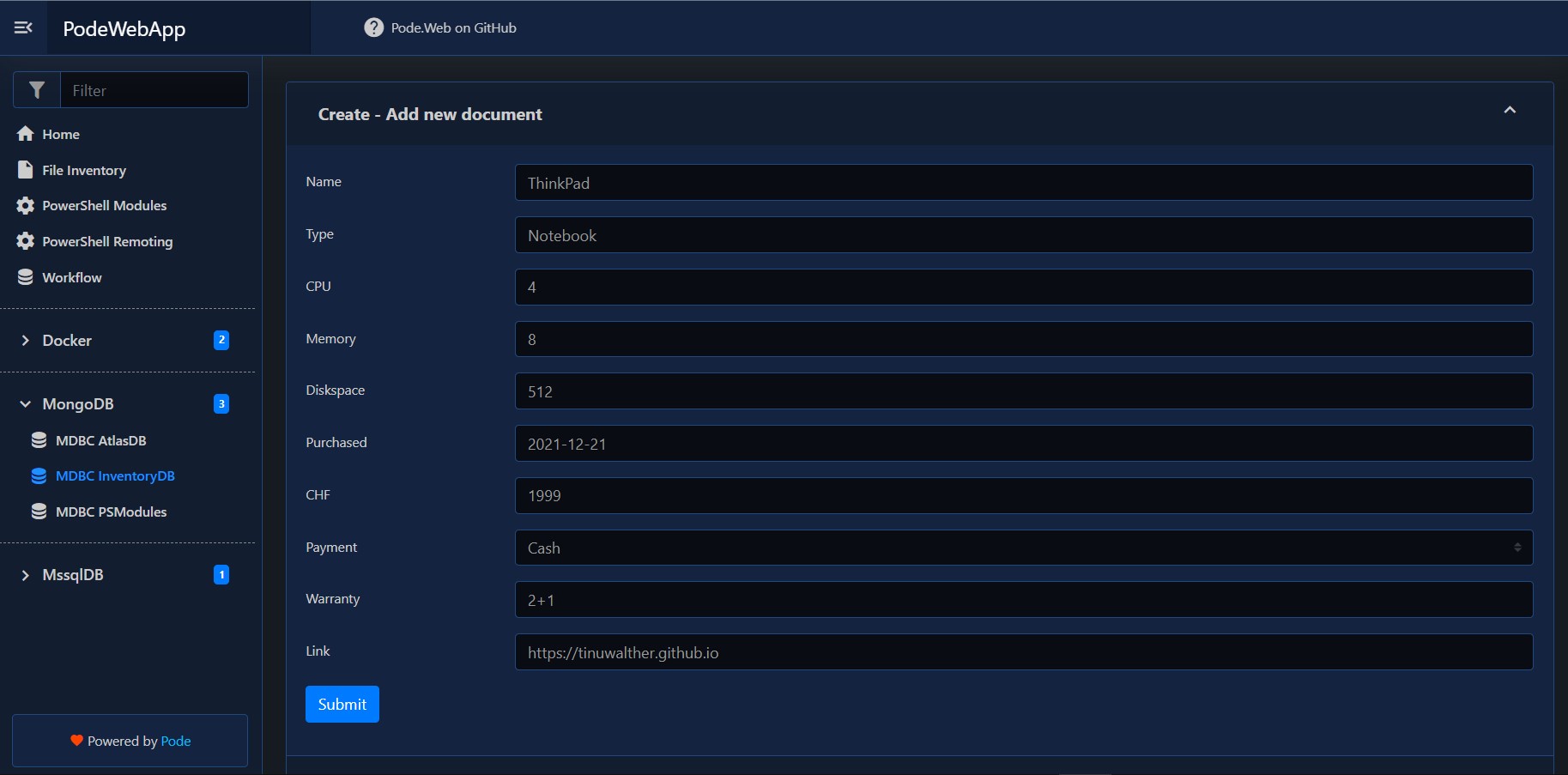
Create
Functions für die Create Operation
- Initialize-MongoDB
- Add-MongoDBDocument
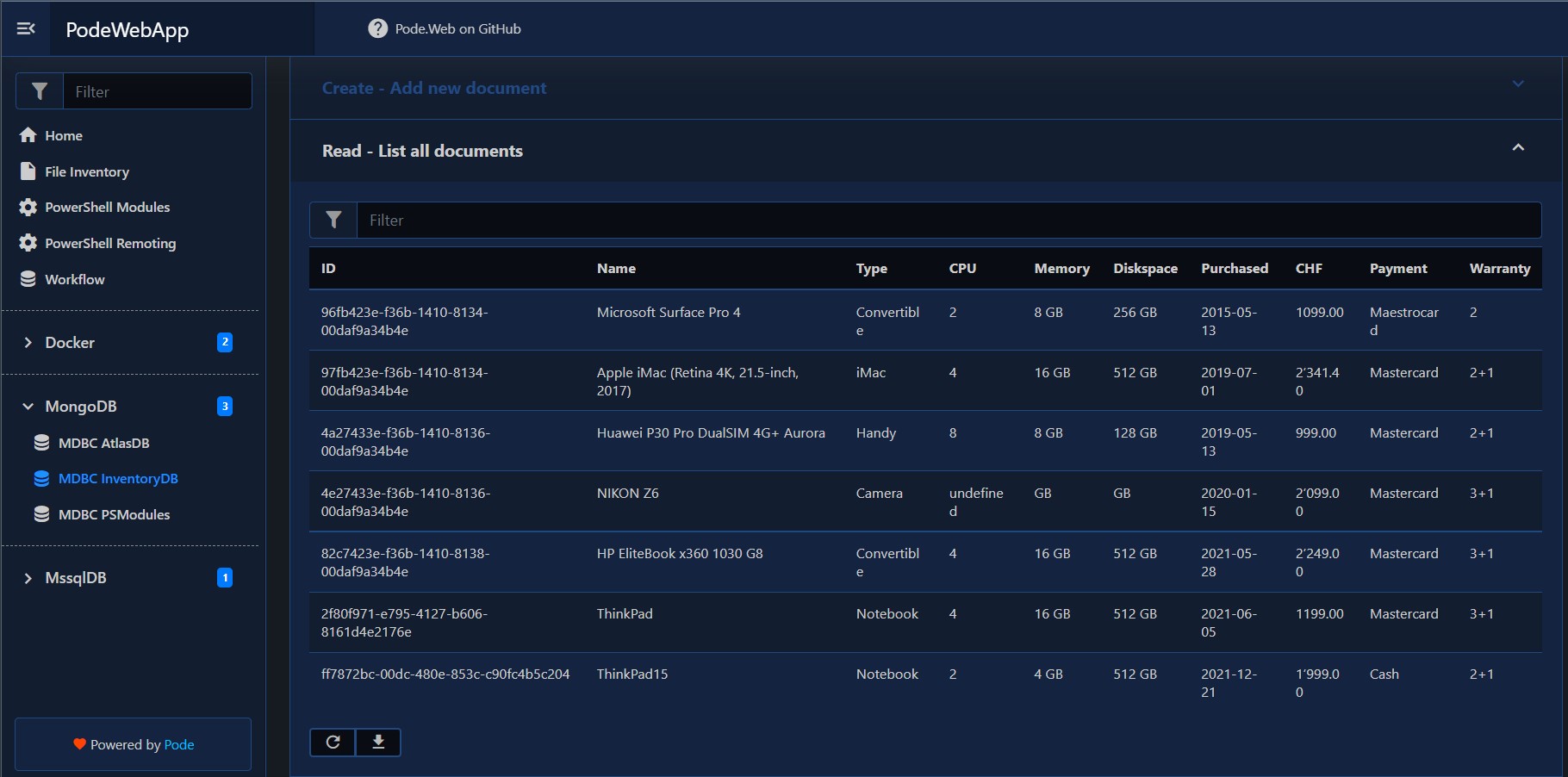
 #### Read
Functions für die Read Operation
- Initialize-MongoDB
- Get-MongoDBData
 #### Update
Functions für die Update Operation
- Initialize-MongoDB
- Update-MongoDBDocument
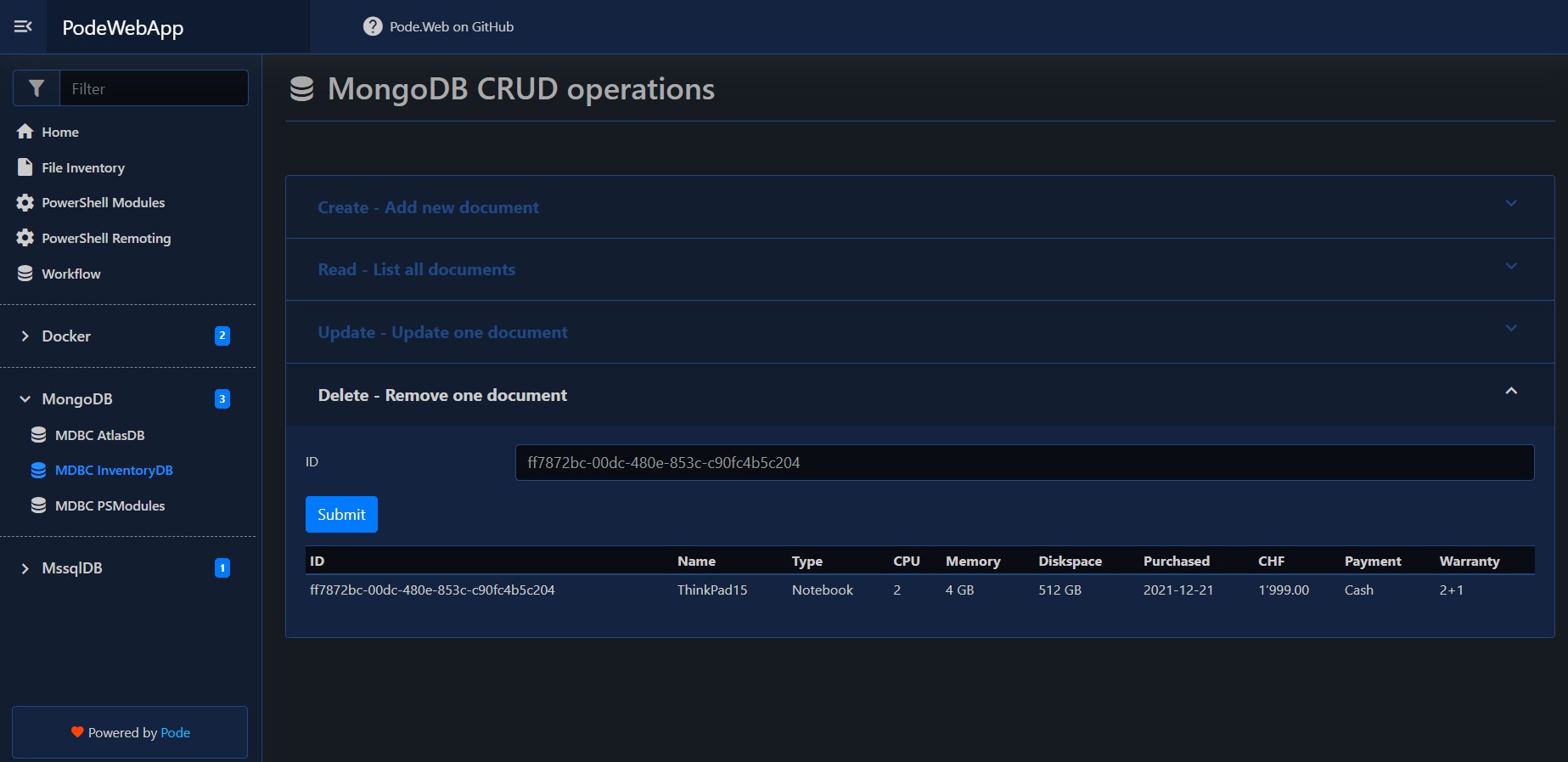
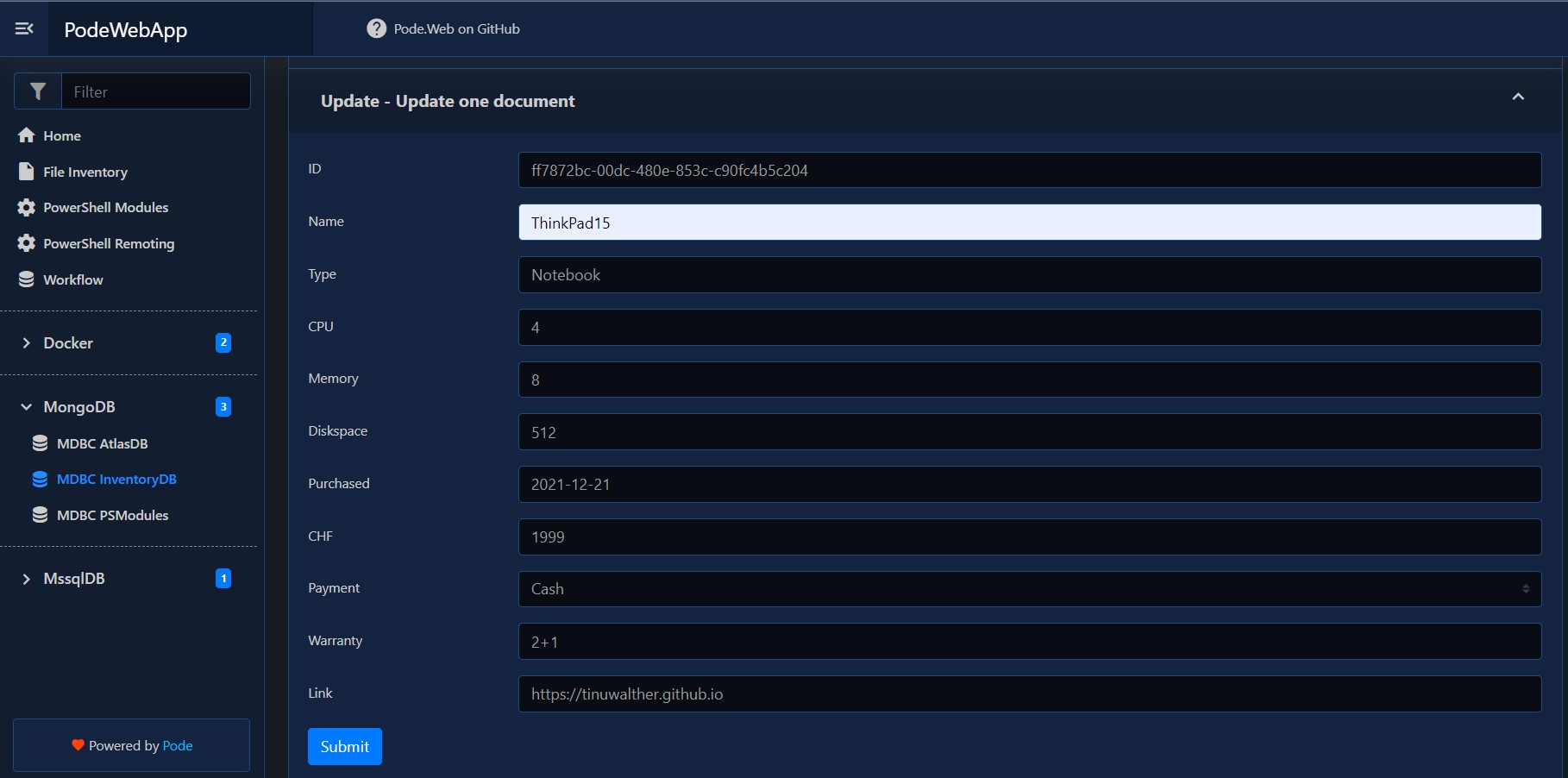 #### Delete
Functions für die Delete Operation
- Initialize-MongoDB
- Get-MongoDBDocument
- Remove-MongoDBDocument
 ### Functions
Die CRUD Operations habe ich in ein Module-File ausgelagert.
mongodb.psm1
function Initialize-MongoDB {
    <#
        Return MongoDBCollection-Object
    #>
    [CmdletBinding()]
    param ()

    if(-not(Get-InstalledModule -Name Mdbc -ea SilentlyContinue)){
        Install-Module -Name Mdbc -Force
        $Error.Clear()
    }

    if(-not(Get-Module -Name Mdbc)){ Import-Module -Name Mdbc }

    $MdbcProperties = @{
        DatabaseName     = 'tinu'
        CollectionName   = 'inventory'
        ConnectionString = 'mongodb://localhost'
    }
    return Get-MongoDBCollection @MdbcProperties

}

function Get-MongoDBCollection {
    param (
        [Parameter(Mandatory=$true)]
        [String]$DatabaseName,

        [Parameter(Mandatory=$true)]
        [String]$CollectionName,

        [Parameter(Mandatory=$true)]
        [String]$ConnectionString
    )

    Connect-Mdbc -ConnectionString $ConnectionString
    $mongo_db  = Get-MdbcDatabase -Name $DatabaseName
    return (Get-MdbcCollection -Database $mongo_db -Name $CollectionName)
}

function Get-MongoDBData {
    <#
        Return all documents
    #>
    [CmdletBinding()]
    param (
        [Parameter(Mandatory=$true)]
        [Object]$Collection
    )
    $properties = @(
        @{N='ID';E={$($_.ID).ToString()}}
        @{N='Name';E={$_.DeviceName}}
        @{N='Type';E={$_.DeviceType}}
        @{N='CPU';E={$_.'Physical cores'}}
        @{N='Memory';E={ "$($_.MemoryGB) GB"}}
        @{N='Diskspace';E={ "$($_.DiskspaceGB) GB"}}
        @{N='Purchased';E={ (Get-Date $_.PurchaseDate -Format 'yyyy-MM-dd') }}
        @{N='CHF';E={ "{0:N2}" -f $($_.Price) }}
        @{N='Payment';E={ $_.Payment }}
        @{N='Warranty';E={ $_.Warranty }}
    )

    return (Get-MdbcData -Collection $Collection -As PS | Select-Object $properties)
}

function Get-MongoDBDocument {
    <#
        Return one document by filter
    #>
    [CmdletBinding()]
    param (
        [Parameter(Mandatory=$true)]
        [Object]$Collection,

        [Parameter(Mandatory=$true)]
        [Object]$Filter
    )
    $properties = @(
        @{N='ID';E={$($_.ID).ToString()}}
        @{N='Name';E={$_.DeviceName}}
        @{N='Type';E={$_.DeviceType}}
        @{N='CPU';E={$_.'Physical cores'}}
        @{N='Memory';E={ "$($_.MemoryGB) GB"}}
        @{N='Diskspace';E={ "$($_.DiskspaceGB) GB"}}
        @{N='Purchased';E={ (Get-Date $_.PurchaseDate -Format 'yyyy-MM-dd') }}
        @{N='CHF';E={ "{0:N2}" -f $($_.Price) }}
        @{N='Payment';E={ $_.Payment }}
        @{N='Warranty';E={ $_.Warranty }}
    )

    return (Get-MdbcData -Collection $Collection -Filter $Filter | Select-Object $properties)
}

function Add-MongoDBDocument {
    <#
        Return the new added document
    #>
    [CmdletBinding()]
    param (
        [Parameter(Mandatory=$true)]
        [Object]$Collection,

        [Parameter(Mandatory=$true)]
        [Object]$Document
    )
    $null = Add-MdbcData -Collection $Collection -InputObject $Document
    return (Get-MongoDBDocument -Collection $Collection -Filter @{ID = $Document.ID})
}

function Update-MongoDBDocument {
    <#
        Update the document
    #>
    [CmdletBinding()]
    param (
        [Parameter(Mandatory=$true)]
        [Object]$Filter,

        [Parameter(Mandatory=$true)]
        [Object]$Collection,

        [Parameter(Mandatory=$true)]
        [Object]$Document
    )
    $null = Update-MdbcData -Filter $Filter -Update @{'$set' = $Document} -Collection $Collection #-Result
    return (Get-MongoDBDocument -Collection $Collection -Filter $Filter)
}


function Remove-MongoDBDocument {
    <#
        Return nothing
    #>
    [CmdletBinding()]
    param (
        [Parameter(Mandatory=$true)]
        [Object]$Collection,

        [Parameter(Mandatory=$true)]
        [Object]$Filter
    )
    $ret = (Get-MongoDBDocument -Collection $Collection -Filter $Filter)
    $null = Remove-MdbcData -Collection $Collection -Filter $Filter
    return $ret
}
Remote Operating
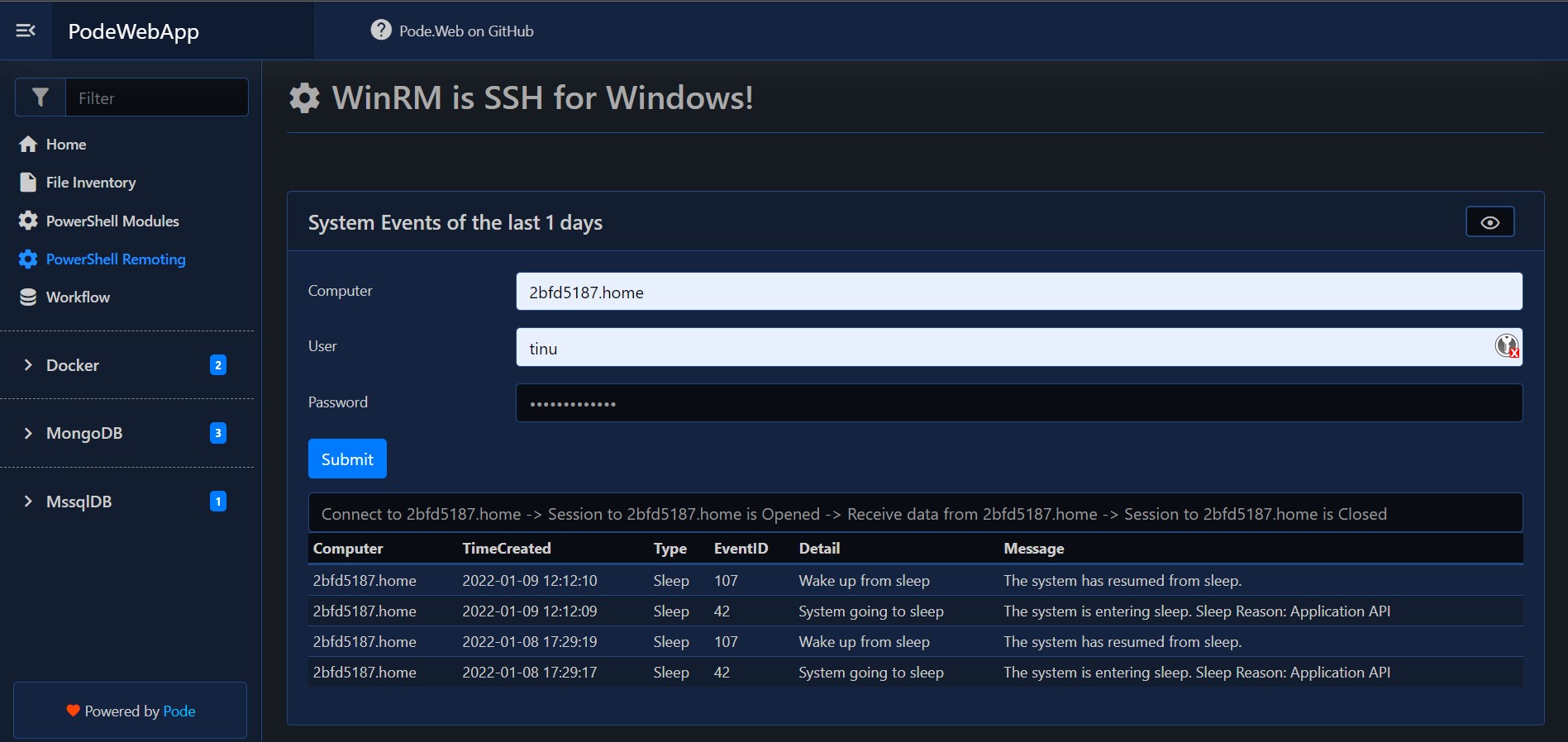
Mit PowerShell Remoting (WinRM) - SSH für Windows auf remote Computern Abfragen/Aktionen durchführen und in einer Website anzeigen.
 ### Konfiguration auf dem Remote Computer
winrm quickconfig
Enable-PSRemoting -Force
Konfiguration auf dem Admin-/Web Server
Computers in a workgroup, or different domain, should be added to allow authentication.
Trusted-Hosts
Set-Item WSMan:\localhost\Client\TrustedHosts -Concatenate -Value '2bfd5187.home'
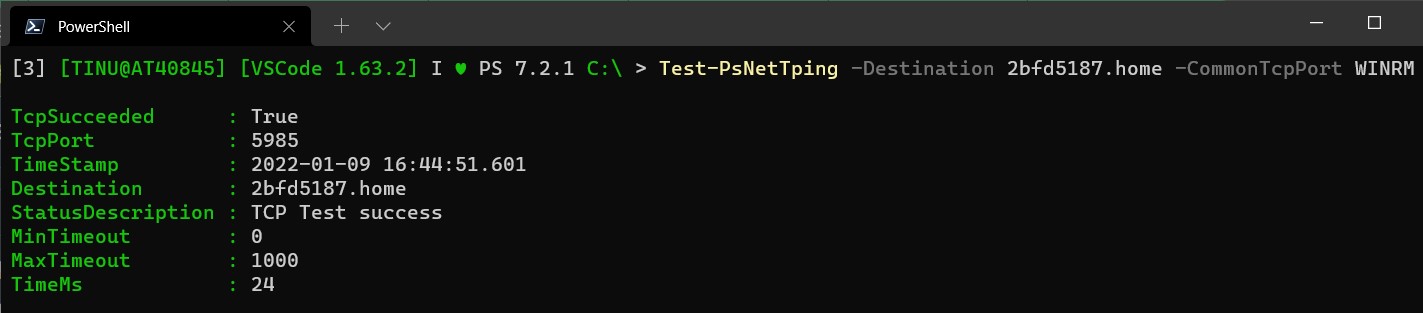
TCP Port Test
Test-PsNetTping -Destination 2bfd5187.home -CommonTcpPort WINRM
 #### WinRM Test
$creds = Get-Credential -UserName 'tinu'
Enter-PSSession -ComputerName '2bfd5187.home' -Credential $creds
 Mit
Exit-PSSession trenne ich die Verbindung zum Remote Computer wieder.
Functions
Für mein Beispiel benötige ich die Functions remote.psm1 und eventlog.psm1, da ich Daten aus dem Eventlog auslesen will.
remote.psm1
function Connect-ToRemoteComputer {
    [CmdletBinding()]
    param (
        [Parameter(Mandatory = $false)]
        [String]$RemoteComputer,

        [Parameter(Mandatory = $true)]
        [String]$Username,

        [Parameter(Mandatory = $true)]
        [SecureString]$Password
    )

    $CachedCreds = New-Object System.Management.Automation.PSCredential ($Username, $Password)
    try{
        return (New-PSSession -ComputerName $RemoteComputer -Credential $CachedCreds -ErrorAction Stop)
    }catch{
        return [PSCustomObject]@{
            State   = 'Error'
            Message = ($_.Exception.Message)
        }
    }
}
eventlog.psm1
Meine Function um die relevanten Eventlogs auszulesen sind ebenfalls in einem Module-File separiert.
function Get-SystemLogs {
[CmdletBinding()]
param (
[Parameter(Mandatory = $false)]
[Object]$RemoteSession,
[Parameter(Mandatory=$true)]
[int[]]$EventID,
[Parameter(Mandatory=$false)]
[Int]$Days = 7
)
$ScriptBlockContent = {
param(
[Parameter(Mandatory=$true)] [Int]$Days,
[Parameter(Mandatory=$true)] [Int[]]$EventID
)
$WinEventProp = @{
LogName = 'System'
Id = $EventID
StartTime = (Get-Date).AddDays(-$Days)
EndTime = (Get-Date)
}
Get-WinEvent -FilterHashtable $WinEventProp | Sort-Object TimeCreated -Descending
}
if($RemoteSession){
$WinEvent = Invoke-Command -Session $RemoteSession -ScriptBlock $ScriptBlockContent -ArgumentList $Days,$EventID
$Computer = $RemoteSession.ComputerName
}else{
$WinEvent = Invoke-Command -ScriptBlock $ScriptBlockContent -ArgumentList $Days,$EventID
$Computer = $env:COMPUTERNAME
}
$ret = foreach($item in $WinEvent){
switch($item.ID){
13 {$detail = 'System shutdown';$Type = 'Shutdown'}
41 {$detail = 'System stopped';$Type = 'Crash'}
42 {$detail = 'System going to sleep';$Type = 'Sleep'}
107 {$detail = 'Wake up from sleep';$Type = 'Sleep'}
109 {$detail = 'System shutdown';$Type = 'Shutdown'}
161 {$detail = 'Memory dump';$Type = 'Crash'}
1001 {$detail = 'Memory dump';$Type = 'Crash'}
1074 {
$null = $item.Message -match '\w+\.exe'
$BehalfOf = $Matches[0]
if($item.Message -match 'power off'){
$detail = "Shutdown by User on behalf of $($BehalfOf)"
$Type = 'Shutdown'
}
if($item.Message -match 'restart'){
$Type = 'Restart'
if($item.Message -match 'NT AUTHORITY\\SYSTEM'){
$detail = "Restart by SYSTEM on behalf of $($BehalfOf)"
}else{
$detail = "Restart by User on behalf of $($BehalfOf)"
}
}
}
1076 {
$detail = 'Unexpected shutdown';$Type = 'Crash'
}
6005 {$detail = 'System startup';$Type = 'Startup'}
6006 {$detail = 'System shutdown';$Type = 'Shutdown'}
6008 {
$Type = 'Shutdown'
$detail = 'Unexpected shutdown'
$null = $item.Message -match '\d{2}\:\d{2}\:\d{2}'
$time = $Matches[0]
$null = $item.Message -match '(?<=on\s)(.*)(?= was)'
$date = $Matches[0] -replace ''
$detail = "$($detail) at $(Get-Date "$($date) $($time)" -f 'yyyy-MM-dd HH:mm:ss')"
}
7031 {$detail = 'Service terminated unexpectedly';$Type = 'Crash'}
default {$Type = $item.id;$detail = 'n/a'}
}
[PSCustomObject]@{
Computer = $Computer
TimeCreated = (Get-Date $item.TimeCreated -f 'yyyy-MM-dd HH:mm:ss')
Type = $Type
EventID = $item.ID
Detail = $detail
Message = $item.Message
}
}
return $ret
}
Page
Die Website mit dem Login für den Remote Computer und der Anzeige der erhaltenen Daten.
Add-PodeWebPage -Name 'PowerShell Remoting' -Title 'WinRM is SSH for Windows!' -Icon 'cog' -ScriptBlock {

    $Days = 1

    New-PodeWebCard -Name "System Events of the last $Days days" -Content @(
        New-PodeWebForm -ArgumentList $Days -Name "Remote Computer" -ScriptBlock {
            param($Days)
            Import-Module .\functions\eventlog.psm1 -Force
            $EventIDArray = @(13,26,41,42,107,109,161,1001,1074,1076,6005,6006,6008,7022,7031,7043)
            if([String]::IsNullOrEmpty($WebEvent.Data.Computer)){
                $Message = "Connect to localhost"
                $SystemLogs = Get-SystemLogs -Days $Days -EventID $EventIDArray
                if([String]::IsNullOrEmpty($SystemLogs)){
                    $Message = "$($Message) -> No data from from $($env:COMPUTERNAME)"
                }else{
                    $Message = "$($Message) -> Receive data from $($env:COMPUTERNAME)"
                    Out-PodeWebTable -Data $SystemLogs -Sort
                }
            }else{
                Import-Module .\functions\remote.psm1 -Force
                $Properties = @{
                    RemoteComputer = $($WebEvent.Data.Computer)
                    Username       = $($WebEvent.Data.User)
                    Password       = ConvertTo-SecureString $($WebEvent.Data.Password) -AsPlainText -Force
                }
                $Message = "Connect to $($WebEvent.Data.Computer)"
                $WSMan   = Connect-ToRemoteComputer @Properties
                if($WSMan.State -eq 'Opened'){
                    $Message = "$($Message) -> Session to $($WebEvent.Data.Computer) is $($WSMan.State)"
                    Import-Module .\functions\eventlog.psm1 -Force
                    $SystemLogs = Get-SystemLogs -RemoteSession $WSMan -Days 1 -EventID $EventIDArray
                    if([String]::IsNullOrEmpty($SystemLogs)){
                        $Message = "$($Message) -> No data from from $($WebEvent.Data.Computer)"
                    }else{
                        $Message = "$($Message) -> Receive data from $($WebEvent.Data.Computer)"
                        Out-PodeWebTable -Data $SystemLogs -Sort
                    }
                    Remove-PSSession $WSMan
                    $Message = "$($Message) -> Session to $($WebEvent.Data.Computer) is $($WSMan.State)"
                }else{
                    $Message = "$($Message) -> Could not establish a remote session to $($Properties.RemoteComputer) with user $($Properties.Username), $($WSMan.Message)"
                }
            }
            Out-PodeWebTextbox -Value $($Message)
        } -Content @(
            New-PodeWebTextbox -Name 'Computer' -Placeholder 'Enter the DNSname or IPAddress of the remote Computer' -Type Text
            New-PodeWebTextbox -Name 'User'     -Placeholder 'Enter the Username of the remote Computer' -Type Text #NoForm
            New-PodeWebTextbox -Name 'Password' -Placeholder 'Enter the Password of the Username' -Type Password #-NoForm
        )
    )
}
In diesen kurzen Beispielen habe ich das Features SSL Zertifikat von Pode, Accordion von Pode.Web aufgezeigt. Weiter habe ich hier aufgezeigt, wie man mit PowerShell Remoting (WinRM) Daten von einem remote Computer einlesen und anzeigen kann. Die Einsatzmöglichkeiten von diesen beiden Modulen sind jedoch fast unendlich und ich habe noch so manche Idee, welche ich umsetzen möchte.
References
Website Pode.Web, Pode.Web on github, MongoDB Cmdlets for PowerShell, PsNetTools, PowerShell Remoting: The Ultimate Guide